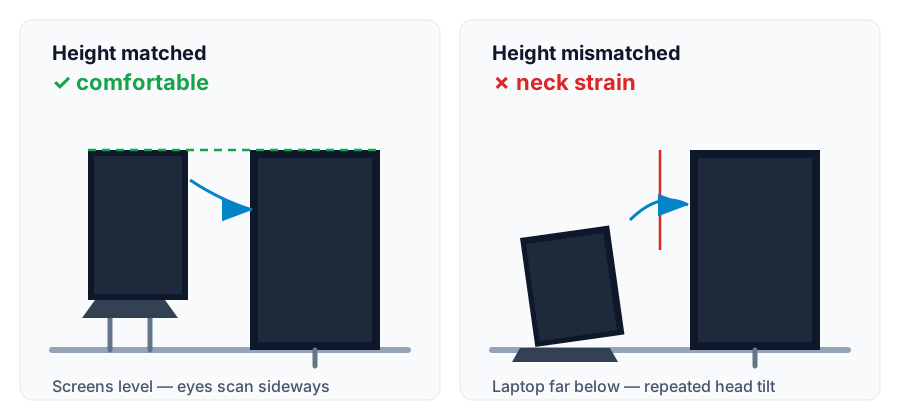
A laptop stand earns its place on a dual-monitor desk for one reason: it can raise the laptop screen close enough to the external monitor's height that scanning between the two stays comfortable. A stand that leaves the laptop far below the monitor turns the second screen into a neck-craning distraction instead of a useful display.
Measure your monitor's height first, then buy by the stand's real height range — not by its folded travel specs or its looks. The picks below are current models that fit dual-monitor desks, matched to the role the laptop screen will play.
This guide covers open-laptop setups where the laptop screen stays active beside an external monitor. If the laptop stays closed in clamshell mode, the screen-height question disappears — follow the laptop manufacturer's guidance on closed-lid use and ventilation instead.
Before you buy
Measure the height match before buying any stand
The expensive mistake is buying a stand, discovering its maximum height leaves the laptop screen far below the monitor, and using it anyway. Check the manufacturer's stated height range against your own measurements. Use the same unit for every measurement below.
Your dual-monitor height-match checklist
Measure
What to include
Your measurement
Monitor screen-top height
Vertical distance from the desk surface to the top of the external monitor's screen (measure to the screen, not the bezel or the stand).
Height: ____
Eye-level reference
OSHA workstation guidance recommends the top of the screen at or slightly below eye level for the primary display. Note whether your monitor already meets that.
Meets guidance: yes / no
Stand's maximum usable height
The height the stand raises the laptop's screen at its highest setting — from the manufacturer's specifications, at the angle you would actually use, not the folded dimensions.
Height: ____
Stand's deployed footprint
Width and depth the stand needs on the desk with a laptop open on it, beside the monitor base or arm. Folded travel specs do not count.
Width: ____ Depth: ____
Keyboard and mouse area
Keep the external keyboard in its normal working position and move the mouse through its normal range. The raised laptop and its cables must stay clear.
Clear: yes / no
Try a tape-measure preview first. Set the external keyboard aside, mark the proposed laptop screen-top height on a box or book stack, and scan between the monitor and the mark. This checks height compatibility only; it cannot establish the stand's stability, weight capacity, or how the height feels over a full day.
Example: if the monitor's screen top is 45 cm above the desk and the stand's maximum raises the laptop screen top to only 35 cm, that 10 cm gap is the ergonomic cost of the stand. Either choose an adjustable stand that reaches higher, lower the monitor to meet the laptop, or reconsider whether the laptop screen should be active.
The heights meet: compare stands by the other dual-monitor criteria below — footprint, stability, and ventilation — then confirm the exact model's supported laptop size, load limit, and height range before ordering.
No stand reaches the monitor height: a fixed riser cannot fix a height gap it does not span. Look at adjustable stands, or lower the external monitor on its stand or arm so the two screens meet.
The laptop is only a glance screen: a modest height mismatch is less punishing for chat, music, or call controls than for a screen you read from all day — but verify the stand is still stable and ventilated at your intended height.
Decide what the laptop screen is for before choosing a stand
Dual-monitor laptop setups fall into two patterns, and they need different stands. Be honest about yours — most buyers overestimate how often they read from the laptop screen.
Pattern A — glance screen
The laptop supports the monitor
The external monitor is clearly the primary screen; the laptop holds chat, reference windows, meeting controls, or music. Height matching helps, but a modest gap is tolerable because you look at the laptop only in short glances. The University of New Hampshire's workstation guidance puts the ideal plainly: dual monitors should be “centered and set at the same height for easy viewing” — aim for that alignment, not exact pixel parity.
Pattern B — equal second screen
The laptop shares the workload
You read and work from both screens for long stretches. Here the laptop screen top should sit near the monitor's top edge so your eyes scan sideways, not up and down. Height range is the deal-breaker criterion.
If you keep catching yourself craning down at a low laptop screen, that is a Pattern B problem being solved with a Pattern A stand. The fix is a taller or adjustable stand — or closing the laptop and simplifying the layout.
Height matching is the buying criterion: the laptop screen's top edge should sit near the monitor's top edge so your eyes scan sideways between the two.Buying criteria
What to look for in a stand for dual-monitor use
Height range that can reach the monitor
Compare the stand's maximum laptop-screen height — from the manufacturer's specifications — against the monitor measurement above. Fixed risers raise one fixed amount; adjustable stands give you the range to fine-tune the match.
Stability at the height you will actually use
A stand's weight capacity and bracing are quoted for a reason. Check your laptop's weight against the stand's rated load, and prefer stands that do not wobble when you type on the external keyboard beside them.
Footprint that fits beside the monitor
Measure the deployed base — feet, tray, or full riser — with the laptop open, beside the monitor base or arm. Folded travel dimensions describe what fits in a bag, not what fits on your desk.
Open, ventilated design
Running a laptop as a second screen for hours generates heat. Prefer stands that leave the underside open for airflow, and follow the laptop manufacturer's guidance on ventilation and closed-lid use.
An external keyboard plan
A laptop raised to screen height puts its own keyboard at an unusable angle. Budget for an external keyboard and mouse, and keep the input zone clear in front of you. The keyboard-with-a-stand guide covers the reasoning.
A cable path that does not drag
A raised laptop needs its charging and display cables routed so they cannot tug the stand. One-cable docking (USB-C or Thunderbolt) keeps the raised laptop tidy; the single-cable guide covers the compatibility checks.
The shortlist for dual-monitor desks
Budget foldable pick
K7 Laptop Stand
The lowest-cost credible portable stand in our comparison: about 200 g, fits 10-inch to 17-inch laptops, and lifts the screen a fixed 14 cm above the desk (per Nexstand's official store). It is not height adjustable — treat it as a fixed riser. Choose it for Pattern A glance-screen duty beside the monitor, where fine-tuning the height is not the binding constraint.
A 6-ounce portable stand with seven selectable height settings and 6.5–12.5 inches of screen lift (per Roost), built for people who move between locations. Choose it when the desk changes often and you want to re-tune the height match at each stop rather than committing to one fixed rise.
The classic fixed aluminum desktop riser for a setup that stays put: a single solid piece of anodized aluminum that raises the screen 5.9 in (150 mm) with an open, heat-sink-style underside (per Rain Design). Choose it for a permanent home-office dual-monitor desk where you have measured that its fixed rise meets your monitor height.
The most adjustable premium desktop option in our comparison: it folds flat, adjusts from 0–45° of keyboard angle, and at full elevation puts a 16-inch MacBook Pro's screen top 22 inches off the desk — Twelve South even calls out aligning it with monitors like the 27-inch Studio Display (per Twelve South). Choose it for Pattern B setups when you need maximum height range without giving up a premium feel.
Product details, price, and availability can change, so verify them on the current product page before ordering. These are the same current picks as our laptop-stand comparison, framed here for the dual-monitor height-matching decision.
How to match the laptop height to the monitor, step by step
Measure the monitor first. Record the desk-to-screen-top height with the monitor in its final position. If it sits on an arm, extend the arm where you will use it.
Set the target height. Aim for the laptop screen's top edge near the monitor's top edge, with the primary screen's top at or slightly below eye level per OSHA workstation guidance.
Check the stand's real height range. Use the manufacturer's specifications for the deployed, open stand at a normal viewing angle — not the folded travel dimensions. Fixed risers give one number; adjustable stands give a range.
Recheck the footprint with the laptop open. A stand that reaches the right height is still wrong if its base or the open laptop crowds the keyboard zone or the monitor base.
Type on the external keyboard, not the raised laptop. The stand's job is screen placement; the keyboard's job is comfortable input. Keep both where they belong.
Best next reads
Use these pages to finish the dual-monitor laptop decision
Some links on this page may be affiliate links. See the affiliate disclosure and use the contact page for corrections or business inquiries.
Sources and verification
Primary references
OSHA and University of New Hampshire workstation guidance used to verify screen position and dual-monitor alignment. Stand specifications below are from the manufacturers' own product pages, verified October 15, 2026. These are non-affiliate references.