Multi-monitor trading desk guide
Desk Setup for Day Traders: Multi-Monitor Ergonomics and Infrastructure
A day-trading desk is the densest monitor setup in a home office: charts, scanners, news, and an order ticket, all live at once. The setup works when every screen has a fixed role, the screens sit at eye level in an arc you can read with your eyes instead of your neck, and the behind-the-desk infrastructure — power, network, cables — never interrupts a trade.
This guide walks through the decisions in the order that matters: screen geometry, mounting, desk size, glare, then the infrastructure underneath it all. It is research-based, not hands-on tested — the ergonomic figures below are quoted from OSHA and American Optometric Association guidance, and the arm specifications are quoted from Ergotron's published specs, checked October 8, 2026.
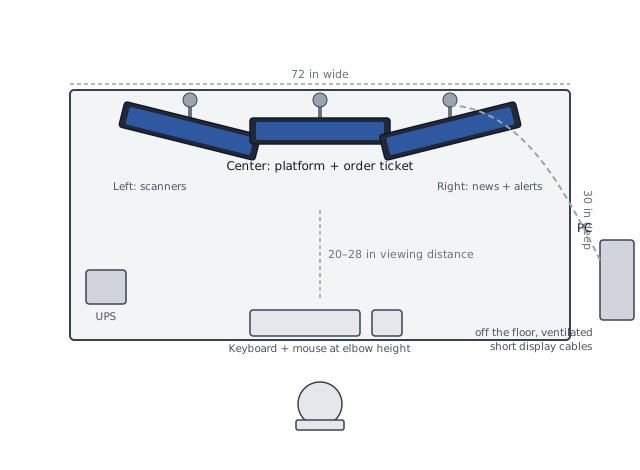
Illustration: DeskGearScout
Editorial guide by DeskGearScoutLast reviewed October 8, 2026How we researchReport a correction
This guide is for home-based day traders running two to six monitors. It is research-based, not hands-on tested — the ergonomic figures below are quoted from OSHA and American Optometric Association guidance, and the arm specifications are quoted from Ergotron's published specs, checked October 8, 2026.
Fast answer
Fix in this order
Ranked by how much of your trading day each fix touches.
1. Give every screen a fixed role
Platform and charts centered, scanners and news on the sides. A screen with no fixed role is decoration — and neck movement.
2. Mount the screens at eye level
Top of each screen at or below eye level. Individual arms give independent angle; triple bars give a cleaner footprint for three or more.
3. Size the desk for the bank
Width math for your screens, 24 to 30 inches of depth minimum. The desk that fits you may not fit six screens.
4. Kill glare across every screen
Desk at right angles to windows, blinds on the offending window, room brightness matched to the screens. One bad window reflects across multiple panels.
5. Harden the infrastructure
PC off the floor with airflow, wired ethernet, a UPS between your setup and the power grid, and cables routed so nothing snags.
Decide screen geometry before you buy anything
A trading desk is a cockpit, and the layout rule is the same one OSHA's workstation checklist uses for any monitor: the screen you read most should sit directly in front of you, so you never twist your head or neck to see it. Give the center screen the job you stare at all day — the charting platform and order ticket — and arc the secondary screens toward you so checking a scanner or a news feed is a glance, not a head turn. Screens that only matter occasionally belong at the edges of the arc, not between you and the center.
Before counting screens, answer one question: multi-monitor or one super-ultrawide? A 49-inch 32:9 panel is roughly two 27-inch screens with no center bezel — one arm, one cable run, one mount to get right. The tradeoffs are real: it is a single point of failure, the geometry is fixed, and you cannot mix orientations. Separate monitors give you independent fullscreen apps per screen, let you grow one screen at a time, and let you rotate a side panel to portrait for order books and news feeds — arms rotate a full 360 degrees. If you run four or more live roles, separate monitors usually win; for two to three, an ultrawide can be the cleaner desk.
For stacked rows — a second row above the first — keep the top row tilt angled slightly down toward your eyes and check the honest test: if you have to tip your head back to read it, the stack is too high for that screen to hold a live role. Put only glance-level information up top.
Mounting: individual arms vs triple bars vs stock stands
The mounting decision is what makes three to six screens physically possible. Three practical options:
- Individual gas-spring arms. One arm per screen, each with independent height, tilt, pan, and rotation. This is the most flexible path and the easiest to grow — add a screen, add an arm. As a sizing reference, Ergotron's published specs for its LX dual side-by-side arm list 7 to 20 lbs of capacity per monitor, VESA 75/100 mounting holes, and a desk clamp that fits edges up to 2.6 inches thick (checked October 8, 2026). Whatever brand you choose, the check is the same: weigh each monitor against the per-arm capacity and confirm the VESA hole pattern before ordering.
- Triple or quad bars on one base. A vertical pole with brackets holds two to four screens from a single clamp. The footprint is cleaner — one base instead of four — and the screens stay in a fixed arc. The cost is independent adjustment: you trade per-screen freedom for a tidier desk. Bundled three-monitor solutions are a standard product category (Ergotron lists an LX Pro triple-arm bundle on its mounts page), and our single vs dual monitor arm guide walks through the arm-count decision logic that scales up to larger banks.
- Stock stands. The stands that came in the box eat desk depth, their feet collide with each other in a bank, and they rarely reach true eye level on a standard desk. For one screen they are fine; for a bank they are the first thing to replace.
One rule covers all three: match the monitor's actual weight — the "with stand" weight in its spec sheet — to the per-arm or per-bracket capacity, not the screen size alone. A light 27-inch gaming panel and a heavy 27-inch pro panel are not the same load.
Desk width and depth for a monitor bank
Size the desk for the screens, not just for yourself. A 24-inch 16:9 monitor is about 22 inches wide; a 27-inch is about 24 inches wide. So two 27s side by side want roughly 48 inches of screen — a 60-inch desk handles that comfortably. Three 24s want about 66 inches — that is a 72-inch desk, and you will appreciate the leftover inches at the ends for arm clamp access and a lamp. Measure your actual screen count with these widths before ordering a desk; the desk that fits your arms does not automatically fit your bank.
Depth matters as much as width. The American Optometric Association recommends 20 to 28 inches of viewing distance for comfortable screen reading. For a monitor bank that means a minimum of about 24 to 30 inches of desk depth, with 30 being the comfortable target: a 30-inch desk lets you keep a three-screen arc at a true arm's length without the screens hanging over the front edge. Two facts make depth easier: monitor arms extend — many reach 24 to 25 inches — so the screens can sit closer to you than the back edge, and the screens themselves sit on the arms, not on feet that eat the front of the desk.
Check the desk edge, too. Clamp arms need a solid back edge — thick decorative lips or modesty panels can block the clamp. Confirm your desk's edge thickness against the arm's clamp range (the Ergotron dual arm above fits edges up to 2.6 inches thick, which covers most solid desks but not all chunky tops).
Glare control at monitor scale
OSHA's workstation evaluation checklist includes a line traders should read twice: glare from windows or lights should not be reflected on your screen, because bad glare forces the awkward posture of peering around reflections. On a two-screen desk that is an annoyance. On a five-screen bank it is a wall of reflections — one badly placed window reflects across multiple panels at once.
The free fixes, in order of leverage:
- Put the desk at right angles to the windows. OSHA's workstation environment guidance names this the default: not facing the window, not backing it, at a right angle, with adjustable blinds on the window that produces glare.
- Blinds before everything else. Adjustable blinds or drapes on the offending window eliminate the strongest light source. Keep the room usable — you want light in the room, just not directly in your field of view or on the screens.
- Match the room to the screens. Bright light sources behind the screens create contrast problems that wash images out; keep room brightness roughly matched to the screens' brightness and adjust each screen's brightness and contrast for viewing comfort.
- Watch overhead reflections. Six glossy panels catch every ceiling light. If you cannot move the desk, moving or dimming the offending light is cheaper than fighting six screens.
Fix glare before spending money on mounts or desks. It is free, it touches every screen you own, and it ruins even a well-mounted bank.
PC placement, cables, power, and network at scale
Under a trading desk, infrastructure is not cosmetic — it is uptime. The practical order:
- PC off the floor. Floor placement is dust plus restricted airflow; a low stand or a side position on the desk keeps intakes clear and the tower reachable for cable runs. Keep it ventilated and near enough that display cables are short — long, marginal display runs are a classic source of flicker.
- Wired ethernet over Wi-Fi. A cable run to the router removes Wi-Fi variability from the trading day. It is the cheapest reliability upgrade on this list.
- A UPS between you and the grid. A power blip that restarts your PC mid-trade is the one failure a UPS exists to absorb — it keeps the platform and router alive through brief outages so you can flatten positions instead of watching a black screen. Size it for the whole load (PC, monitors, router), not just the tower.
- Route cables like infrastructure. Three to six screens mean at least six to twelve cables (power plus display per screen). Route power and video separately, label both ends so a failure is traceable, and use the arms' built-in cable channels. If the desk is sit-stand, leave slack loops at every pivot point so the bank can travel without pulling connectors. Our cable management basics and single-cable desk setup guides cover the routing order and under-desk details.
If the desk is sit-stand, one more check: the lifting frame has a rated capacity, and a bank of four to six monitors plus the desk surface is a real load. Add up the weights before assuming the frame handles it — and expect the bank to need re-leveling after the first few height cycles.
Best next pages
Build the bank, then tune the gear
The guides that pair with this one, matched to the decision you are making next.
Best if you want your personal sitting and standing numbers — desk, monitor top, and chair height from your body.
Best if you are still deciding whether two screens are enough — the layout rules that scale up to larger banks.
Best if you have decided on arms and need to choose the mounting path for one or more screens.
Best if you are choosing between arms and a simpler riser for getting screens to eye level.
Best if the cable count is already out of control — the routing order for under-desk runs.
Best if you are shopping arms now and need the compatibility checks organized in one place.
Before you buy anything
- List every screen and its fixed role; screens without a role get removed before you size anything.
- Confirm each monitor's VESA 75 or 100 holes and its actual weight against the per-arm or per-bracket capacity.
- Do the width math — about 22 inches per 24-inch screen, 24 per 27-inch — before ordering a desk; depth of 24 to 30 inches minimum.
- Fix the free things first: blinds, right-angle window position, viewing distance, text size, screen brightness.
- Put the ethernet run and the UPS on the purchase list now, not as an afterthought — they are cheaper than one bad outage.
- Check the desk edge for clamp arms and, on a sit-stand desk, the frame's lifting capacity against the full weight of the bank.
Sources and verification
Where the figures come from
The ergonomic and specification figures in this guide are quoted from the sources below and were checked on October 8, 2026. These are non-affiliate references; the figures are setup starting points, not medical advice — persistent pain deserves a clinician or a qualified ergonomist, not a number.
- OSHA computer workstation evaluation checklist — monitor directly in front of you; top of the screen at or below eye level; glare from windows or lights not reflected on the screen; monitor distance allows reading without leaning the head, neck, or trunk.
- OSHA workstation environment guidance — position the workstation at right angles to windows; use adjustable blinds on windows that produce glare; keep light sources behind the screens from creating contrast problems; adjust brightness and contrast for viewing comfort.
- American Optometric Association — preferred viewing distance of 20 to 28 inches; the 20-20-20 rule (every 20 minutes, a 20-second break looking at something 20 feet away); a longer break about every two hours of device time.
- Ergotron LX dual-monitor arm specifications (45-489) — per-monitor capacity 2 to 11 lbs; maximum display width 25.1 inches; VESA 75/100; desk clamp fits edges 0.4 to 2.4 inches thick; arm extends up to 24.3 inches.
- Ergotron LX dual side-by-side arm specifications (45-245) — per-monitor capacity 7 to 20 lbs; VESA 75/100; desk clamp fits edges up to 2.6 inches thick; bundled triple-monitor solutions listed in the same product line for three-screen banks.