Small-space guide
Monitor Arm vs Monitor Riser: Which One Should You Get?
If your monitor sits too low, the screen is too far back, or the stock stand is eating your desk, both a monitor arm and a monitor riser can fix it — but they fix it in very different ways. An arm floats the screen above a fully cleared desk. A riser is a simple platform that lifts the monitor a fixed few inches while giving you storage underneath.
The right choice comes down to three things: whether your monitor has VESA mounting holes, whether your desk edge can take a clamp, and how much height adjustment you actually need.
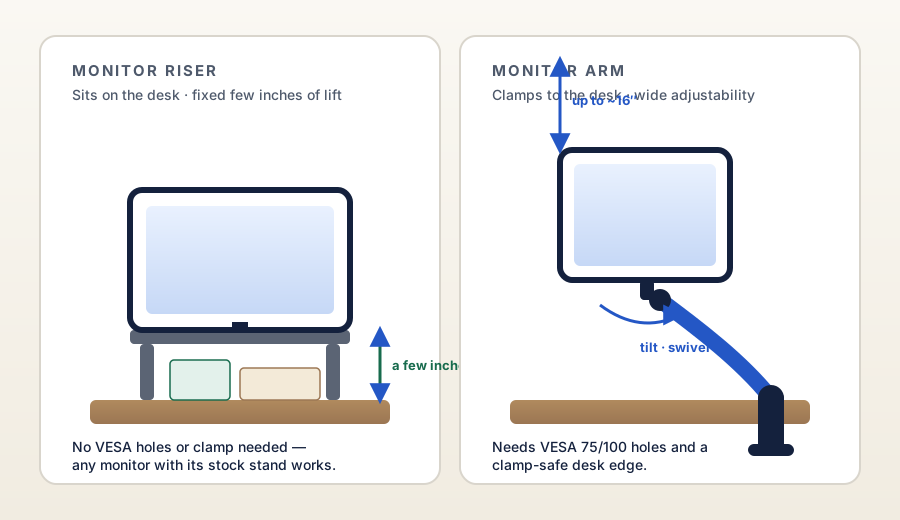
Illustration: DeskGearScout
Editorial guide by DeskGearScoutLast reviewed September 28, 2026How we researchReport a correction
This guide is for remote workers deciding between the two most common ways to raise an external monitor on a small desk. It is research-based, not hands-on tested — model specs below are quoted from manufacturer and brand-listed sources, checked September 28, 2026.
Fast answer
Choose based on what your desk and monitor allow
Most people end up in one camp once they check three things: the monitor's back panel, the desk edge, and how much lift they need.
Choose a monitor arm if...
Your monitor has VESA 75 or 100 mounting holes, your desk edge can safely hold a clamp, and you want real adjustability — height, tilt, swivel — plus the desk surface fully cleared underneath the screen.
Choose a monitor riser if...
Your monitor has no VESA holes (or you want to keep the stock stand), your desk cannot take a clamp safely, you only need a few inches of lift, or you like the idea of a shelf with storage underneath.
What a monitor arm solves better
Full adjustability
A gas-spring arm lets you change height, tilt, and swivel with one hand. The HUANUO FlowLift, for example, lists a lift of up to 39.6 cm above the desk with tilt from −50° to +85° (per HUANUO's listing), so you can dial the screen to eye level and swing it around for video calls without rebuilding the setup.
The surface stays clear
An arm removes the stock stand entirely, so the whole area under the screen becomes usable desk space — keyboard, documents, a desk mat, whatever you actually reach for.
Cleaner cable routing
Most arms route power and display cables along the arm itself, which makes a small desk feel less visually crowded than a stand with cables trailing behind it.
What a monitor riser solves better
No mounting required
A riser is freestanding: you set it down and put the monitor on top. There are no VESA holes to check, no clamp to tighten, and no risk to a thin, glass, or otherwise clamp-unfriendly desk.
Storage underneath
The shelf a riser creates is usable space — 3M's MS80B is explicitly designed around columns that leave room underneath, and metal risers like BONTEC's include cable management and pen slots in the platform itself.
Simpler and cheaper
A riser is usually the least expensive way to raise a screen, assembles in minutes with basic hardware, and moves with zero effort when you rearrange the desk.
The spec reality check
Manufacturer specs make the tradeoff concrete. Arms give you range; risers give you a few fixed steps. Quoted from brand-listed sources, checked September 28, 2026:
Typical arm: wide range
HUANUO's FlowLift (HNSS6) lists 13–32 in monitors, 4.4–19.8 lbs, VESA 75/100, and up to 39.6 cm (about 15.6 in) of lift. ErGear's current single-arm listing states a similar envelope: 13–34 in, up to 19.8 lbs, VESA 75/100. Both offer C-clamp or grommet mounting.
Typical riser: fixed steps
3M's MS80B adjusts from 1 in to 5-7/8 in in 1-5/8 in increments and is rated to 80 lbs. BONTEC's metal riser offers three heights — 3.9 in, 4.7 in, 5.5 in — with a 44 lb (20 kg) capacity. Most risers land in the 3–6 in lift band.
What that means for ergonomics
The widely used ergonomic rule of thumb is the top of the screen at or just below eye level. If your monitor needs more than a few inches of lift to get there — common with taller people or low desks — a riser may top out before you do. Arms rarely have that problem.
Three checks that decide it
- Check the monitor's back panel. Look for the square four-hole VESA pattern (75×75 mm or 100×100 mm). If it is there, an arm is on the table. If it is not — common on very cheap or all-in-one style displays — a riser is the simpler route.
- Check the desk edge. Arms clamp to the back edge or bolt through a grommet hole, so the edge needs to be solid wood or similar, thick enough for the clamp (FlowLift lists 0.59–3.54 in), and free of crossbeams underneath. Glass tops, thin hollow-core slabs, and desks with a modesty panel usually rule the clamp out — see our clamp position guide and against-a-wall guide for the full checks.
- Check how much lift you need. Sit in your chair, close your eyes, open them, and note where your natural gaze lands. If the screen top is only a few inches below that line, a riser closes the gap. If it is much lower, only an arm gets you there without stacking books under a platform.
Best fit by situation
Which upgrade makes more sense for your desk?
Small desk, external monitor, fixed setup
Start with a monitor arm. Reclaiming the surface under the screen is the biggest single space win a small desk gets.
Monitor without VESA holes
Start with a riser. There is no arm to buy that fits a monitor with no mounting points, and the riser still gets the screen to a better height.
Rental or shared desk you cannot modify
Start with a riser. No clamp marks, no grommet drilling, nothing to undo when you move out.
Frequent height tweaks and video calls
Start with a monitor arm. One-handed repositioning and swivel toward the camera are things a fixed platform cannot do.
What to check before you buy either one
- Whether the monitor back has VESA 75 or 100 mounting holes.
- Whether the desk edge can hold a clamp safely — thickness, material, and clearance underneath.
- How many inches of lift the screen actually needs to reach a comfortable eye line.
- Whether the space under the screen matters to you — storage shelf versus fully clear surface.
- Whether you ever need to swing the screen toward you for calls or share it with someone beside you.
- Whether the desk may move or the setup will be rearranged often.
Best next pages
Decide with the comparison, then check the fit
Once you know which path fits your desk, these pages cover the mounting checks and the category comparison.
Best if the answer is a monitor arm and you want to compare fit, desk mounting, rear clearance, and stability before buying.
Best if you picked the arm path and need to find the one clamp-safe spot on a cramped desk.
Best if the desk pushes against a wall and you need to know whether the arm can swing without hitting it.
Best if you run two screens and need to decide between one mount or two before worrying about risers at all.
Best if the real question is the two-screen layout, not just how one screen sits.
Best if tidier cables are half the reason for the upgrade — the arm path pairs well with a routing plan.
Final takeaway
If the monitor has VESA holes and the desk takes a clamp, a monitor arm is usually the better long-term upgrade: more adjustment, a fully clear surface, and cleaner cables. If either check fails — no VESA holes, a clamp-unfriendly desk, a rental you cannot modify — a monitor riser is the honest fix: a few inches of lift, storage underneath, and zero installation risk.
Shop the path you chose
Move from the desk decision to one current starting point
If the arm path fits, use the live routes below. If the riser path fits, our current comparisons only cover monitor arms — the checklist above is your buying guide until we expand coverage.
Monitor-arm path
HUANUO FlowLift Single Monitor Mount
Start here if reclaiming space under an external monitor is the main goal and your desk has a suitable clamp area.
Monitor-riser path
Risers: buy by the checklist
Start from the three checks above, then compare risers on height steps (typically 3–6 in), weight capacity, and platform footprint — those three numbers decide fit.
Sources and verification
Where the model facts come from
Spec figures are quoted from brand or brand-listed sources and were checked on September 28, 2026. These are non-affiliate references; always confirm current details on the product page before buying.
- HUANUO FlowLift single monitor mount (HNSS6) — current brand listing: 13–32 in, 4.4–19.8 lbs, VESA 75/100, up to 39.6 cm lift, C-clamp or grommet (0.59–3.54 in), 20,000-cycle gas spring, 5-year warranty.
- ErGear single monitor arm — current brand listing and published manual: 13–34 in, up to 19.8 lbs, VESA 75/100, C-clamp or grommet mounting.
- 3M MS80B adjustable monitor stand — 3M published specs via office-supply listing: 1 in to 5-7/8 in height in 1-5/8 in increments, 80 lb capacity, 15 in × 12 in platform.
- BONTEC metal monitor riser — BONTEC published manual and official product page: three heights (3.9 in / 4.7 in / 5.5 in), 44 lb (20 kg) capacity, 14.5 in × 9.1 in platform.