1. Get the monitor to eye level
Top of the screen at or just below eye level, about an arm's length away. This single change fixes most neck and upper-back complaints.
A programming desk is where you spend the most concentrated hours of your day — often eight to twelve, staring at text. The difference between a setup that disappears under you and one that hurts you is not expensive gear; it is a short list of positions: the screen at eye level, the keyboard below the elbows, and a day that is not all sitting.
This guide walks through those decisions in the order that fixes the most pain first: monitor, then keyboard, then movement, then eyes. It is research-based, not hands-on tested — the ergonomic figures below are quoted from OSHA and American Optometric Association guidance, checked October 5, 2026.
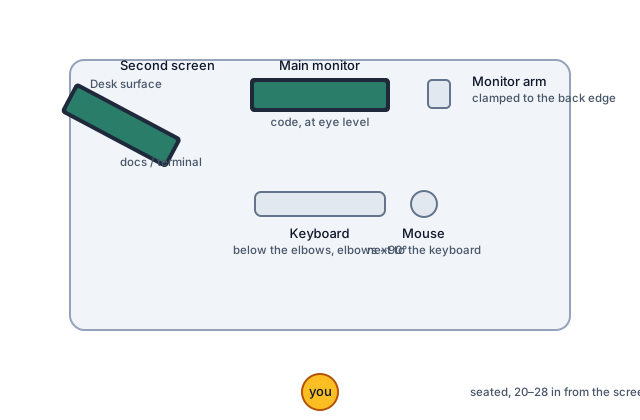
Illustration: DeskGearScout
OSHA's computer workstation guidance states the rule plainly: the top of the screen should be at or below eye level so you can read it without bending your head or neck down or back. For a developer reading text all day, that means the code you look at most should land in the top half of the screen — set the screen height first, then adjust your editor's font and zoom rather than leaning in.
Distance matters as much as height. The American Optometric Association recommends 20 to 28 inches from the eyes to the front surface of the screen, with the center of the screen about 15 to 20 degrees below eye level. If you cannot hold that distance without squinting, make the text bigger instead of moving the screen closer. Monitor arms are the standard way to reach eye level on a fixed desk; our monitor arm vs monitor riser guide covers the VESA, clamp, and lift checks, and our desk height calculator computes your personal monitor-top number from your height.
The classic 29-inch fixed desk roughly fits a 50th-percentile adult male — and almost nobody else. Anyone shorter ends up shrugging to reach the keyboard; anyone taller ends up hovering. The test OSHA's workstation checklist uses: the keyboard platform should let your hands sit over the keyboard with your elbows near your torso at an angle of 90 to 100 degrees. That is the whole test. If your shoulders rise or your elbows flare out to type, the surface is at the wrong height relative to your body, not the other way around.
Three rules cover the rest: keep the keyboard horizontal or tilted slightly away from you (negative slope), never propped up on its back feet; keep the mouse right next to the keyboard at the same level, not reaching out to a higher surface; and keep hard desk edges off your wrists — rest on the forearm or float, not on the edge. Our keyboard and mouse basics guide covers switch, size, and hand-fit questions once the height is right.
No posture is a good posture if you hold it all day. The meaningful upgrade is not standing versus sitting — it is alternating. Split the day into blocks: stand for a chunk of morning focus, sit through afternoon meetings, stand again before the day ends. The cheapest version of this habit costs nothing: stand up between compiles, calls, and context switches.
If you buy a sit-stand desk for this rotation, set both heights from your body, not from a preset — our desk height calculator gives the sitting and standing numbers to aim for. And keep the habit that matters when standing: feet flat or on a footrest, weight shifting, no locking the knees. See standing desk basics for the monitor, cable, and mat details that make a standing setup actually comfortable.
Most developers run two jobs on their screens: code on the primary, documentation, terminal, or a browser on the secondary. Put the screen you stare at most dead center, at eye level, and angle the second screen toward you so checking it is a glance, not a head turn. If both screens are equal priority — code on one, tests or preview on the other — center yourself between them and keep them the same height so your neck does not compensate for the difference.
The mounting checks are the same as for any dual-screen desk: VESA 75 or 100 holes on the back of each monitor, a desk edge that can take a clamp, and enough depth to keep both screens at a real viewing distance. Our dual monitor basics covers layout, and single vs dual monitor arm walks through the mount decision for small desks.
Eye strain — dry eyes, headaches, blurred vision after long sessions — is the most common complaint at coding desks, and it is the cheapest to address. The American Optometric Association's core guidance:
One thing not worth buying on faith: blue-light claims. The American Academy of Ophthalmology notes there is no scientific evidence that blue light from digital devices damages eyes, so treat blue-blocking marketing as unproven and spend the money on the free fixes above first.
A coding desk accumulates chargers, hubs, docks, and display cables — and a sit-stand coding desk moves through all of them twice a day. Route cables so the moving parts can travel: leave slack loops at every pivot point, keep the run from desk to PC independent of the run on the moving frame, and keep power and USB/display runs separable so a problem is traceable without crawling under the desk mid-debug. Our single-cable desk setup guide and cable management basics cover the routing order and under-desk details.