Video-call gear guide
Ring Light vs Key Light for Video Calls: Which One Should You Get?
Once a desk lamp and a window stop being enough for video calls, the two dedicated lights everyone reaches for are ring lights and key lights. They look different, mount differently, and — this is the part that actually matters on camera — they shape light differently.
A key light is a flat panel that throws soft, even light at your face from off to one side. A ring light is a circle of LEDs with a hole in the middle that wraps light evenly around your face, usually with the camera or phone mounted right in the center. Both can make you look dramatically better on calls. The right one depends on your desk space, how you sit, and whether you ever record anything beyond meetings.
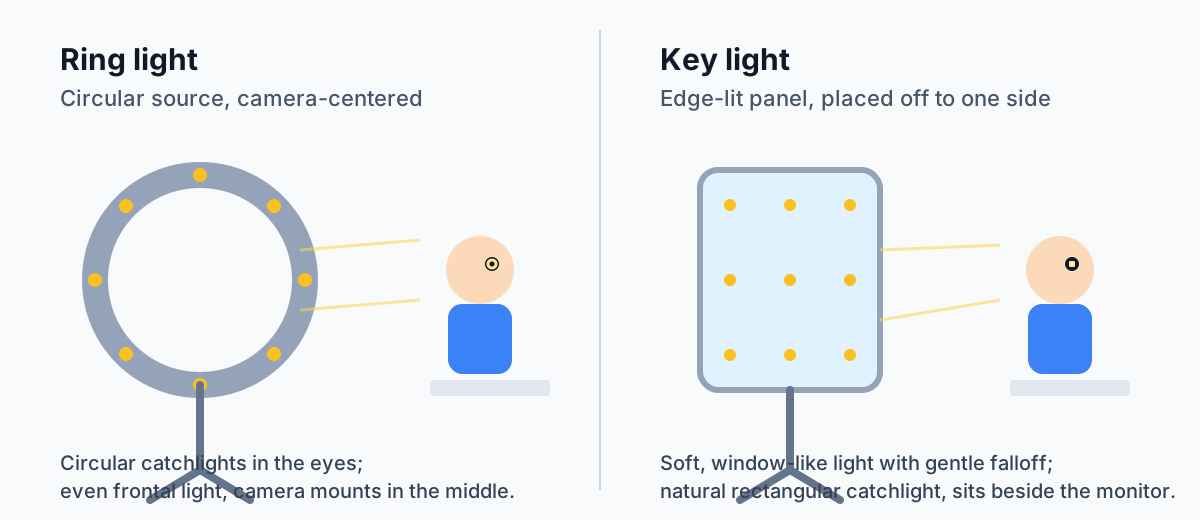
Illustration: DeskGearScout
Editorial guide by DeskGearScoutLast reviewed October 12, 2026How we researchReport a correction
This guide is for remote workers choosing between the two most common dedicated lights for video calls. It is research-based, not hands-on tested — model specs below are quoted from manufacturer and brand-listed sources, checked October 12, 2026. Start with our
video-call lighting basics if you have not tried the free fixes first.
Choose based on where the light has to live
Most desks make this decision quickly once you check footprint, distance, and what else you shoot.
Choose a key light if...
You want the softest, most natural-looking face light, you have room for a panel on a stand or clamp beside or above the monitor, and you mostly do meetings rather than record vertical video.
Choose a ring light if...
You want the most even frontal light with the smallest fuss — camera or phone mounted in the middle of the ring — and you like the distinctive circular catchlight, or you record talking-head clips as well as calls.
What a key light solves better
Softer, more natural light
A panel is a large, flat source, and a larger source relative to your face produces softer shadows and gentler falloff. The result looks closer to window light: even, forgiving, and flattering across skin tones without the flat "spotlit" look a small hard source gives.
Real brightness for real rooms
Key lights are built to be the main light in the room, so they tend to run brighter than comparably priced ring lights. That headroom matters when your room is dark, your background is bright, or daylight swings during the day — you can turn a bright panel down, but you cannot turn a dim ring light up past its maximum.
Mounts like desk furniture
Panels usually clamp to the desk edge or sit on a weighted base behind the monitor, keeping the desk surface clear. They stay out of your eyeline, so you are not staring into the light itself — and there is no ring intruding into the frame if you stand up or lean back.
The placement fundamentals still apply whichever format you pick: one soft source in front of you, slightly off to one side and a little above eye level, kept out of the monitor's reflection path. Our desk setup for streamers guide covers key-light placement for long on-camera sessions, where consistency matters even more than on a thirty-minute call.
What a ring light solves better
Even frontal light, zero shadows
Because the light wraps around the lens axis — your camera sits in the middle of the ring — the illumination is almost shadowless: no nose shadow, no glasses glare from one side. For quick calls and talking-head clips where you do not want to think about angles, that on-axis symmetry is genuinely convenient.
Camera and phone mount in the middle
Most ring lights include a phone holder or camera mount at the center of the ring. If you take calls or record from a phone, that is a one-piece setup: light and camera share one tripod, one footprint, and one cable.
The catchlight look
A ring light puts a visible circular catchlight — the reflection of the light — in your eyes. Some people find it distracting; content creators often want it deliberately, because it reads as bright and engaged on camera. A panel gives the smaller rectangular catchlight you would get from a window, which looks more natural.
The spec reality check
Manufacturer specs make the tradeoff concrete. Both formats cover a similar color-temperature range and land in the 90s on CRI — so color quality is not the differentiator. Brightness headroom and mounting are. Quoted from manufacturer and brand-listed sources, checked October 12, 2026:
Key lights: panel specs
Elgato's Key Light Air MK.2 lists a 15-inch edge-lit panel, up to 2,100 lumens, 2,900–7,000 K, and CRI 94+, powered over USB-C (per elgato.com; launch MSRP $139.99). Logitech's Litra Glow is the compact end of the category: 250 lumens, 2,700–6,500 K, CRI 93, USB-C bus power — no battery — with a three-way monitor mount (per logitech.com). Lume Cube's Broadcast Lighting Kit pairs its Panel Go light (2,700–7,500 K per the current product page) with a telescoping desktop stand and suction-cup mount, marketed specifically for video calls (per lumecube.com; $99.99).
Ring lights: ring specs
NEEWER's RP18B Pro 18-inch ring light kit lists 320 LEDs, 3,300 lux at 0.5 m, 2,900–7,000 K, and CRI 97+ with 0–100% dimming (per neewer.com; $149.99 listed, $169.99 list). The honest caveat: it ships on a floor-standing tripod (27.2–61.4 in), so it positions behind or beside your desk rather than clamping to it. At the compact end, the ALTSON 60 LED clip light offers three color modes (white, natural, warm), 10 brightness levels, and a 2,200 mAh rechargeable battery in a 95 g clip-on unit — but ALTSON has no manufacturer site and its own listing copies conflict on the exact Kelvin range, so treat the color range as "three modes," not a number.
What that means for your desk
Color rendering is a wash: everything current sits at CRI 93 or above, which is comfortably in the range where skin looks natural on camera. The real differences are headroom and housing. A 2,100-lumen panel gives you brightness to spare when the room is dark or the background is bright — you can always turn a bright light down. And mounting decides daily friction: a clamp or monitor-mounted panel disappears into the desk, while a tripod ring needs floor or desk space in front of you. Measure twice, buy once.
Three checks that decide it
- Check the desk footprint. A panel on a stand or clamp lives beside or above the monitor and needs a few inches of clearance. A ring light on a tripod needs floor or desk space in front of you — fine on a deep desk, awkward on a shallow one where the ring ends up uncomfortably close to your face.
- Check the distance to your face. Light gets harsher and more intense as it gets closer. If the only place a light fits is 18 inches from your face, a big soft panel is more forgiving than a small hard ring. If you can get three or more feet of distance, either format works.
- Check what else you shoot. Meetings only? Pick on light quality and footprint. Talking-head clips, demos, or vertical video for social? The ring light's centered camera mount and shadowless frontal light are built for exactly that.
Best fit by situation
Which light makes more sense for your desk?
Dark room, bright background, long calls
Start with a key light. Brightness headroom and soft falloff are what tame difficult rooms, and a panel off to the side stays out of your eyeline for hours.
Phone-based calls and quick clips
Start with a ring light. The centered phone mount turns one tripod into the whole setup, and the shadowless frontal light flatters without any placement fuss.
Glasses wearer fighting reflections
Start with a key light, placed off to one side. On-axis ring light hits glasses straight on and can bounce back into the lens; an angled panel keeps reflections off the glass.
Tiny desk, no room behind the monitor
Start with a compact panel or clip light that mounts on the monitor itself. A tripod ring in front of a shallow desk crowds your face; a slim bar above the screen disappears.
What to check before you buy either one
- Brightness you can turn down — buy headroom, not your exact current need.
- Adjustable color temperature, so the light can match the room from morning daylight to evening lamps.
- CRI in the 90s, so skin tones render naturally on camera rather than washed out or greenish.
- How it mounts: desk clamp, weighted base, monitor mount, or tripod — and whether your desk fits that mount.
- How it is powered: USB bus power keeps cabling simple; a battery adds flexibility but another thing to charge.
- Whether the light stays out of your eyeline at your normal seating position — staring into the source is fatiguing on long calls.
- Whether you have already tried the free fixes: facing a window, killing backlight, and repositioning a desk lamp. See our video-call lighting basics first.
Best next pages
Fix the light, then fix the rest of the call
Once the light is decided, these pages cover the fundamentals and the other call-quality categories.
Best if you want the direction, glare, and consistency fundamentals — including the free fixes to try before buying any light.
Best if your on-camera time runs to hours per session — key-light placement and consistency matter even more there.
Best next read if the face is well lit now and the camera itself becomes the bottleneck.
Best next read if the visual side improves but your audio still lets meetings down.
Best if the light, camera, and mic are sorted and the bigger issue is overall room layout and visual heaviness.
Final takeaway
For most meeting-heavy remote workers, a key light is the better buy: softer light, more brightness headroom, and a mount that disappears behind the monitor. A ring light earns its place when you want the simplest possible setup — light and camera in one unit — or you record talking-head video where the centered, shadowless look is the point. Either way, buy the light for the room you actually have, check the mounting before you order, and try the free placement fixes first.
Shop the path you chose
Move from the format decision to one current starting point
Our current comparisons do not cover video lights yet, so there is no category comparison to hand you off to — the checklist above is your buying guide until we expand coverage. The manufacturer references in the sources section below are non-affiliate; confirm current details on the product page before buying.
Key-light path
Panels: buy by the checklist
Start from the three checks above, then compare panels on brightness (lumens), color-temperature range, CRI, and mounting — those four numbers decide fit. The spec comparison above names the current manufacturer-sourced starting points.
Ring-light path
Rings: buy by the checklist
Start from the three checks above, then compare rings on diameter, color-temperature range, CRI, and whether the center mount fits your camera or phone — those four numbers decide fit.
Sources and verification
Where the model facts come from
Spec figures are quoted from manufacturer or brand-listed sources and were checked on October 12, 2026. These are non-affiliate references; always confirm current details on the product page before buying. Prices below are manufacturer-listed, not marketplace prices.
- Elgato Key Light Air MK.2 — elgato.com product page: 15-inch edge-lit panel, up to 2,100 lumens, USB-C power, 2,900–7,000 K, CRI 94+, launch MSRP $139.99.
- Logitech Litra Glow — logitech.com: 250 lumens max, 2,700–6,500 K, CRI 93, USB-C bus power (no battery), three-way monitor mount.
- Lume Cube Broadcast Lighting Kit (LC-BLK) — lumecube.com: Panel Go light + telescoping desktop stand + suction-cup/laptop mount + USB-C cable, $99.99; Panel Go 2,700–7,500 K per the current product page.
- NEEWER RP18B Pro 18-inch ring light kit — neewer.com: 320 LEDs, 45 W, 3,300 lux at 0.5 m, 2,900–7,000 K, CRI 97+/TLCI 98, floor-standing tripod (27.2–61.4 in), $149.99 listed ($169.99 list).
- ALTSON 60 LED clip light — brand's Amazon listing copy (no manufacturer site found): three color modes (white, natural, warm), 10 brightness levels, 2,200 mAh rechargeable, clip + ¼-inch tripod adapter; the listing's Kelvin figures conflict between copies and are omitted here.
- HumanCentric video conference light bar — humancentric.com: 8-inch bars, USB-C powered, single/double kits, monitor mount, daisy-chainable up to 4 lights.
- NEEWER lighting guide — neewer.com: the softest output comes from the modifier with the largest apparent source size relative to the subject; catchlight shape mirrors the modifier shape.
- Logitech "Top 10 Tips to Look Your Best on Video" — logitech.com: position light in front of you, camera at eye level, avoid brightly lit backgrounds.