Standing Desk Converter vs Full Standing Desk: Which Sit-Stand Upgrade Fits Your Desk?
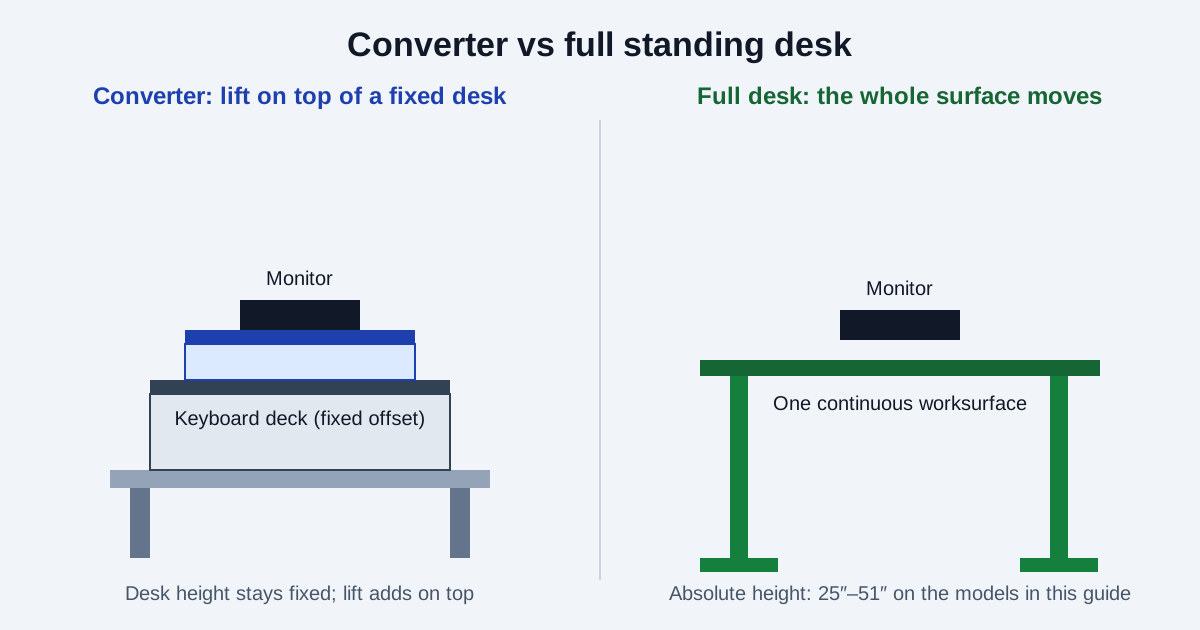
You want to stand while you work, and there are two ways to get there: put a riser on the desk you already own, or replace the desk with one that moves. They look like the same purchase. They are not — a converter adds lift on top of a fixed height, while a full desk sets its own height, carries several times the weight, and gives you one continuous worksurface instead of a split tray.
This guide compares the two on the numbers the manufacturers actually publish: lift range, weight capacity, keyboard-tray offset, and footprint. All specifications below come from the manufacturers' own pages and spec sheets, verified October 26, 2026.
What each option actually is
A standing desk converter (also called a desktop riser) sits on top of your existing desk. It is typically two-tiered: an upper surface for monitors and a lower, forward keyboard deck that moves with the upper surface. You raise the whole unit to stand and lower it to sit. Your desk stays, your monitor stands stay, and nothing is installed — Vari's VariDesk Pro Plus 36 ships fully assembled, and Ergotron's WorkFit-TL ships fully assembled with no mounting or clamping required.
A full standing desk replaces the desk. The entire worksurface moves on motorized legs, keyboard and monitors share one surface, and height is set absolutely — Vari's Electric Standing Desk adjusts from 25 to 50.5 inches, and the Fully Jarvis on a 3-stage frame adjusts from 25.5 to 51 inches. The old desk has to go, assembly is part of the deal, and the purchase is furniture, not an accessory.
That distinction matters for the rest of this guide: everything a converter does is constrained by the desk underneath it, while everything a full desk does is constrained only by its own frame.
Check 1: Added height vs absolute height
This is the check most buyers skip, and it is the one most likely to rule a converter out. A converter does not set a height — it adds lift to whatever your desk already is. The VariDesk Pro Plus 36 lifts its worksurface 4.5 to 17.5 inches above your desk; the Ergotron WorkFit-TL lifts 15 inches. So the question is never "how high does the converter go?" but "desk height plus converter lift — does that reach my standing elbow height?"
A full desk has no such dependency. Its range is absolute: 25 to 50.5 inches for the Vari Electric Standing Desk (60x30 standard version), 25.5 to 51 inches for the Jarvis 3-stage frame. If your desk is unusually high, or you are tall enough that desk-plus-lift falls short, the full desk's absolute range is the only number that can still work. Measure your desk's height and your standing elbow height before choosing — do not guess either one.
Once the height works, the ergonomics are the same either way, and they are about alternation, not standing all day. Cornell's ergonomics guidance puts it plainly: the real benefit of sit-stand is changing between sitting and standing, and standing in a static posture is even more tiring than sitting in one. Weill Cornell's home-office guide gives the usable rhythm: switch to standing for at least five minutes every hour, and do not stand all day. Our standing desk setup tips build the full routine around that principle.
Check 2: Weight capacity — an order of magnitude apart
Converter weight caps are small because the converter is a mechanism sitting on a desk, not a frame bolted to the floor. The VariDesk Pro Plus 36 supports up to 35 lbs. The Ergotron WorkFit-TL is rated 10 to 40 lbs — note that it is a range, with a 10 lb minimum as well as a 40 lb maximum, because its constant-force mechanism must be matched to the load. The motorized FlexiSpot AlcoveRiser EM7 is rated to a 44 lb maximum load. Two monitors, a laptop, a monitor arm clamped to the riser, and desk accessories add up fast against a 35–44 lb ceiling.
Full desks live in a different class: 200 lbs for the Vari Electric Standing Desk (60x30 standard version), 350 lbs for the Fully Jarvis. If your setup is heavy — dual monitors plus arms, a desktop computer on the desk, speakers, books — the converter cap is the binding constraint, and no amount of lift range fixes it. Total everything that will sit on the riser, not just the monitors.
Check 3: The keyboard tray is a fixed offset, not a free choice
On a converter, the keyboard deck sits below the monitor surface and moves with it, at a fixed offset you cannot adjust independently. On the WorkFit-TL, the keyboard tray is 27.5 inches wide by 11 inches deep and sits 4.5 inches below the worksurface. That offset is fine if it happens to match your elbow-to-eye geometry, and awkward if it does not — and there is no dial to change it.
There is a second, subtler version of the same problem: on the WorkFit-TL, monitors sit directly on the worksurface by default. There is no independent monitor-height adjustment unless you buy an optional monitor kit (sold separately, capacities not verified here). If your eye level needs the monitor higher than the worksurface puts it, you need a riser or arm — which is an extra purchase and extra load against that 40 lb cap. On a full desk, keyboard and monitor share one surface, so the whole setup moves together and a monitor arm or riser adjusts from that single surface. Cornell's monitor guidance is the same either way: eyes in line with a point 2–3 inches below the top of the screen, screen about an arm's length away, keyboard at elbow height with flat wrists.
Check 4: Footprint — the converter eats the desk it sits on
A converter occupies the desk it sits on, so its footprint is lost workspace. The WorkFit-TL's footprint is 37.5 by 23 inches, and Ergotron requires a surface 24 inches deep or larger — a desk shallower than that rules the model out outright, whatever its other specs. The VariDesk Pro Plus 36 is 36 inches wide with a two-tier layout; the FlexiSpot EM7's surface is 36 by 16.3 inches. Measure your desk's depth and usable width, then check what is left beside and behind the riser for everything that does not fit on it.
A full desk has no such tradeoff because its footprint is the workspace — but it also means the old desk must go, and the new desk's size is a furniture decision: 60 by 30 inches for the Vari in this guide, 48 to 72 inches wide for the Jarvis depending on configuration. If your room cannot take a bigger desk, or you rent and move often, the converter's reversibility is a real advantage: it lifts off, and the desk underneath is unchanged.
The spec table
Every figure below is from the manufacturer's own page or spec sheet, verified October 26, 2026. Variant names matter: Vari's capacity is 200 lbs for the standard 60x30 Electric Standing Desk but 180 lbs for the ComfortEdge 72x30 version — never quote one variant's number for another. The Jarvis figures are for the 3-stage frame with the OLED programmable handset (four presets); the simpler up-down toggle handset has no presets.
| Model | Type | Height / lift | Weight capacity | Worksurface & keyboard |
|---|---|---|---|---|
| Vari VariDesk Pro Plus 36 | Converter, spring-assisted | 4.5–17.5 in. lift, 11 height settings | Up to 35 lbs | Two-tier, separate keyboard/mouse deck; dual-monitor compatible; fully assembled |
| Ergotron WorkFit-TL (33-406) | Converter, constant-force | 15 in. lift, straight up and down | 10–40 lbs (range, incl. minimum) | 37.5 × 23 in. worksurface; 27.5 × 11 in. tray, 4.5 in. below surface; needs 24 in.+ deep desk; fully assembled; 5-year warranty |
| FlexiSpot AlcoveRiser EM7 (36 in.) | Converter, motorized | Not verified on a FlexiSpot page — omitted | 44 lbs maximum | 36 × 16.3 in. surface; FlexiSpot describes room for two 21.5 in. monitors; quick-release keyboard tray |
| Vari Electric Standing Desk 60x30 (standard) | Full desk, electric | 25–50.5 in. absolute | 200 lbs | 60 × 30 in., 1.25 in. top; 4 programmable presets with LED display; T-style legs, heavy-duty steel foot |
| Fully Jarvis Bamboo, 3-stage frame (via Herman Miller store) | Full desk, electric | 25.5–51 in. absolute | 350 lbs | 48–72 in. wide configs, 0.75 in. bamboo top; OLED handset, 4 presets; dual motor, 1.5 in./sec, under 50 dB; assembly required |
A note on one famous desk that is not in the table: FlexiSpot's E7. FlexiSpot's own regional pages disagree about it — the UK page describes 125 kg capacity with up to four preset heights, while the Canada page describes the Pro Plus E7 at 355 lbs with a two-preset premium keypad — though both agree on the 22.8 to 48.4 inch height range. Until FlexiSpot publishes one consistent spec for the exact SKU you would buy, we will not quote a single E7 spec as fact. Check the keypad and capacity on the SKU itself.
Who should buy which
- Buy a converter if you like your current desk, your total riser load is comfortably under its cap, your desk is at least 24 inches deep, and desk height plus lift reaches your standing elbow height. You keep the desk, skip installation, and can reverse the whole decision.
- Buy a full desk if you need a full worksurface at standing height, carry a heavy setup, need independent monitor positioning without stacking accessories, or the added-height math fails. The Vari's 25 to 50.5 inch range and the Jarvis's 25.5 to 51 inch range cover tall users a converter cannot reach.
- Buy neither yet if your desk is shallower than 24 inches (the WorkFit-TL's minimum), your monitor height is still wrong after conversion (fix that first — see the desk height calculator), or your desk itself wobbles. A converter on a wobbly desk is a wobbly standing desk; our standing desk wobble database collects real owner stability reports.
- Think twice about "converter now, desk later" as a plan. It is a fine trial, but the converter spend does not transfer to the full desk. Buy the converter because it fits, not as a placeholder for a desk you already know you need.
The pre-purchase checklist
- Measure desk height, depth, and usable width. Depth under 24 inches rules out the WorkFit-TL; width under the converter's footprint rules out that model.
- Find your standing elbow height (see the desk height calculator), then check desk height plus converter lift against it — or a full desk's absolute range.
- Weigh everything going on the riser — monitors, laptop, arms, accessories — and compare the total with the converter's cap, including any minimum-load range.
- Check the keyboard offset. A fixed tray 4.5 inches below the surface suits some bodies and not others; if your monitor also needs independent height, budget for a kit or arm and its weight.
- Decide on reversibility. Renting, moving soon, or unsure about standing work at all? The converter's removability is worth real money. Settled, heavy, and tall? The full desk is the honest buy.
- Plan the sit-stand rhythm, not just the furniture. Alternate hourly — at least five minutes standing per hour per Weill Cornell — and keep the rest of the setup honest with the standing desk setup tips, cable management, and ergonomic seating guides.
Whichever you buy, the setup still decides whether it helps
A converter or a full desk only changes your height. Monitor at eye level, keyboard at elbow height, hourly alternation between sitting and standing — those are what make the height useful. Start with the setup guide, not the furniture catalog.
Primary references
Desk and converter specifications below are from the manufacturers' own pages and spec sheets, verified October 26, 2026. No retailer prices, ratings, or review data were used. Ergotron's WorkFit-TL specifications are from Ergotron's own published spec sheet; Ergotron's product page itself rendered no spec table on the verification date. These are non-affiliate references.
- Vari VariDesk Pro Plus 36 spec sheet (Vari-published)
- Ergotron WorkFit-T/TL spec sheet (Ergotron-authored)
- FlexiSpot AlcoveRiser EM7 (FlexiSpot's own article)
- Vari Electric Standing Desk 60x30 spec sheet (Vari-published)
- Vari Electric Standing Desk ComfortEdge 72x30 (Vari Canada page — 180 lb variant)
- Fully Jarvis Bamboo Standing Desk (Herman Miller store, current seller)
- FlexiSpot E7 UK page (variant figures cited in the E7 note)
- FlexiSpot Pro Plus E7 Canada page (variant figures cited in the E7 note)
- Cornell University Ergonomics Web — Computer Workstation Ergonomics Guidelines
- Weill Cornell Medicine EHS — Ergonomics in the Home Office (updated June 2026)