Standing Desk Setup Tips: Make the Sit-Stand Switch Work
Most standing desks are set up once — at the wrong height — and never touched again. The desk moves, but the rest of the setup does not: the monitor stays at sitting height, the cables are routed for one position, and “standing more” quietly becomes “standing in one tiring posture all afternoon.”
Cornell’s ergonomics research says the uncomfortable truth plainly: the real benefit of a sit-stand desk is the change between sitting and standing, not standing itself. These tips are built around that insight — each one grounded in OSHA, Cornell, CCOHS, or university ergonomics guidance, verified October 2026.
This is an editorial guide based on published ergonomics guidance from government and university sources — not hands-on product testing, and not medical advice. Manufacturer facts below (memory presets, monitor-arm support) are from the manufacturers’ own pages, verified October 19, 2026. If pain persists, talk to a clinician.
Tip 1 — the foundation
Set desk height to your standing elbows, not a round number
The single most common standing-desk mistake is treating height as a vibe: cranking the desk to chest level or copying a colleague’s number. The correct height is personal and measurable. Canada’s Centre for Occupational Health and Safety puts it simply: the platform height should be approximately at your standing elbow position — your arms in the same position as they would be if you were sitting.
OSHA’s workstation guidance fills in the details: elbows stay close to the body and bent between 90 and 120 degrees, hands, wrists, and forearms straight and roughly parallel to the floor. The U.S. Office of Congressional Workplace Rights says the same thing another way: adjust the desk so your elbows are at your sides, bent at 90 degrees or more, with forearms horizontal. (Cornell adds a useful guardrail: keep the elbow angle at or above 90 degrees to avoid nerve compression at the elbow.)
Calibrate it yourself. Stand with shoes you will actually work in, let your arms hang, bend your elbows to 90 degrees, and measure from the floor to your fingertips — that is roughly your standing desk height. The desk height calculator does this arithmetic from your height and applies OSHA and Cornell guidance.
Re-check it seasonally. Footwear changes the number by a centimeter or two, and a new chair changes your sitting height. A two-minute recalibration beats a year of subtly wrong posture.
Store both heights in the memory presets. An electric desk with programmable presets turns calibration from a one-time chore into a one-button habit. FlexiSpot’s E7, for example, has four programmable memory positions on its keypad (per FlexiSpot) — dedicate one to sitting and one to standing, and you remove the friction that keeps most desks parked in one position forever.
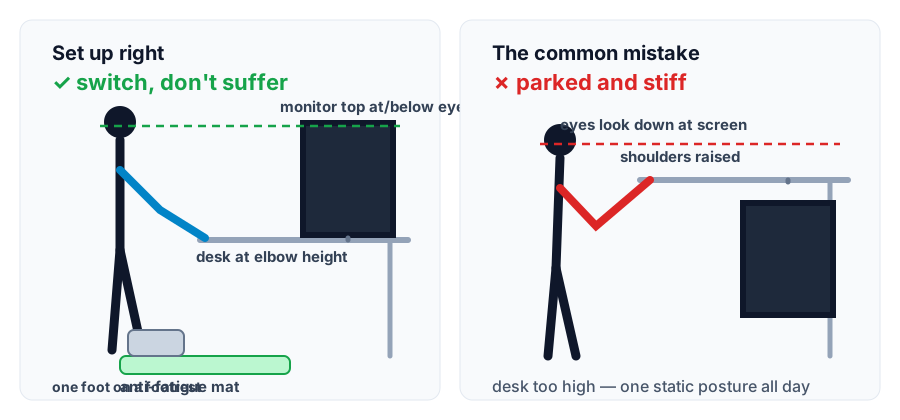
The standing posture that published guidance converges on: desk at elbow height, forearms horizontal, monitor top at or just below eye level at arm’s length, weight shifting onto a footrest.Tip 2 — the point of the whole desk
Alternate sitting and standing — never stand all day
Here is the claim this article is built around, from Cornell’s ergonomics guide: standing in a static posture is even more tiring than sitting in a static posture, so movement matters more than the position. OSHA says it in policy language: regardless of how good your working posture is, working in the same posture for prolonged periods is not healthy — change position frequently throughout the day.
What does “frequently” mean in practice? Two anchors from authoritative sources:
At least five minutes of standing every hour. Cornell’s Weill EHS guidance advises alternating between sitting and standing hourly rather than standing all day — switch for at least five minutes every hour.
The 20-8-2 rhythm as a starting ratio. The University of Virginia cites ergonomics researcher Dr. Alan Hedge’s rule: per 30 minutes of computer use, 20 minutes sitting, 8 standing, 2 moving or stretching. Treat it as a starting pattern to tune, not a prescription — the benefit is the alternation.
Ramp up gradually. If you are new to standing, start with short standing blocks and extend them as comfort allows; if something hurts, sit down. And put the alternation on autopilot: memory presets (tip 1) plus a recurring hourly timer — UPLIFT’s own blog recommends setting a timer to remind yourself to switch every hour — make the rhythm happen without willpower.
One honesty note from Cornell, since this site does not inflate claims: their review found scant evidence that sit-stand furniture has cost-effective benefits, with only tentative evidence of reduced back discomfort. The honest pitch for a standing desk is posture variety and comfort, not a health transformation.
Tips 3–10 — the details people get wrong
Recheck everything at standing height — the desk is the only thing that moved
Re-aim the monitor for standing
The screen-top-at-eye-level rule does not change when you stand — the screen just moved down relative to your eyes. UVA’s guidance: the monitor an arm’s length away, the top of the screen at eye level; Cornell adds that the screen center should sit roughly 17–18 degrees below horizontal. With dual monitors, re-check the alignment too — the dual-monitor guide covers placement, and a monitor arm lets you adjust screen height independently of the worksurface (Cornell: “monitor height is best adjusted by a separate monitor pedestal rather than trying to move a whole worksurface”).
Give cables slack for the full travel
CCOHS warns that cables, electrical access, and layout must not make adjusting the desk difficult. Route everything through an under-desk tray, bundle the runs in a sleeve or spiral wrap, and leave enough slack for the desk’s full travel — then run the desk through its whole range before committing any ties. The cable-management guide and the single-cable guide cover the routing principles.
Consider an anti-fatigue mat — for comfort, not medicine
The U.S. Office of Congressional Workplace Rights, UVA, and CCOHS all recommend considering an anti-fatigue mat when standing on hard floors for longer bouts. Keep the claim honest: the sources support comfort, not treatment or prevention of any condition. It pairs naturally with supportive footwear (below).
Elevate one foot on a rest and shift your weight
OSHA’s standing-posture guidance notes you may elevate one foot on a rest, and CCOHS advises shifting weight from leg to leg or using a footrest to help shift it. Static legs are the problem that makes standing tiring — a footrest turns “stand still” into “stand and move.” The footrest guide covers the setup.
Wear supportive shoes (or good socks, at least)
CCOHS says plainly: wear supportive footwear. UVA adds soft soles to avoid standing on hard surfaces for long durations. Standing barefoot on a hard floor while trying out the new desk is the fastest way to conclude standing “doesn’t work for me” — fix the footwear before judging the habit.
Keep the daily tools inside forearm reach
UVA’s “zone of convenient reach” spans roughly elbow to middle-fingertip with the arm at 90 degrees. On a small desk that means ruthless organization: keyboard, mouse, and the one notebook you actually use live in the primary zone; everything else earns its spot elsewhere. The keyboard-and-mouse guide covers input placement.
Know desk-converter tradeoffs before buying one
A converter on top of a fixed desk looks like a cheap path to sit-stand, but UVA’s EHS notes the documented drawbacks: converters can wobble with heavier equipment, don’t allow fine-tuning of screen and keyboard heights, and take up significant surface area. On a small desk, a full electric frame usually serves the sit-stand rhythm better.
Take 2–3 minute movement microbreaks every half hour
UVA cites research (Radwan et al., 2022) finding that short, 2–3 minute light-intensity microbreaks roughly every 30 minutes combat the musculoskeletal discomfort of sedentary behavior. Roll your shoulders, walk to the window, refill water — the microbreak is the smallest unit of the posture-variety strategy this whole guide is built on.
What to stop doing
Three popular standing-desk claims to drop
“Standing all day is healthier than sitting.” Cornell contradicts it directly: the benefit is the change between postures, and standing all day is its own static posture. If your setup encourages marathon standing, the setup — not your willpower — is the problem.
“Perfect 90 degrees everywhere.” Overstated. OSHA gives elbows a 90–120 degree range, Cornell asks for at least 90 to protect the elbow nerve — and Cornell’s seated guidance notes the best seated posture is actually a reclined 100–110 degrees, not rigid upright 90. Posture is a comfortable range, not a protractor reading.
“A treadmill desk or balance board fixes the sitting problem.” UVA’s EHS explicitly does not condone treadmills or exercise bikes during computer work (fall hazard, posture problems). Balance boards have no authoritative support for core-strength or posture claims — treat one as a weight-shifting reminder at most, not a health device.
The one habit that makes the rest work
Every tip above dies on the same failure mode: the desk stays parked. So make switching the path of least resistance — one preset button for sitting, one for standing, and a timer that tells you to press them. Calibrate both heights once (elbow rule, tip 1), set the timer for hourly, and let the alternation do what Cornell says it does: the switching is the benefit.
Some links on this page may be affiliate links. See the affiliate disclosure and use the contact page for corrections or business inquiries.
Sources and verification
Primary references
Ergonomics guidance and manufacturer facts below are from the organizations’ own published pages, verified October 19, 2026. No Amazon prices, ratings, or review data were used. These are non-affiliate references.