Do You Need an Anti-Fatigue Mat for a Standing Desk?
The honest short answer: a mat is one of the cheapest ways to make standing more comfortable — and one of the most oversold. Vendor pages promise dramatic fatigue reductions, but the ergonomics guidance and the laboratory evidence behind them say something quieter: mats help with comfort during prolonged standing, they do not treat or prevent injury, and no mat fixes standing all day.
This guide separates the two questions people actually conflate — should I stand more? and should I buy a mat? — then gives you the checks that matter (edges, size, thickness, durability) and three mats whose specs are verified from the manufacturers’ own pages, November 2026.
This is an editorial guide based on published ergonomics guidance and manufacturer specifications — not hands-on product testing, and not medical advice. No prices, ratings, or review scores are used: prices change and cannot be verified at reading time. If pain persists, talk to a clinician or ergonomist rather than buying a thicker mat.
The short answer
Yes, if you stand on a hard floor for longer bouts. No, if you barely stand.
Three authoritative sources converge on the same conditional recommendation. Canada’s Centre for Occupational Health and Safety (CCOHS) says that if you must stand on hard floors, stand on mats — and its sit-stand desk guidance says to “consider the use of an anti-fatigue mat, where appropriate.” The U.S. Office of Congressional Workplace Rights and Cornell’s ergonomics guidance make the same comfort recommendation for longer standing bouts on hard surfaces. None of them presents a mat as a medical device, and none of them requires one.
So the decision turns on your actual standing pattern, not on whether you own a standing desk:
You likely benefit if you stand for hour-plus stretches on concrete, tile, laminate, or another hard floor, especially in thin-soled shoes or socks.
You likely do not need one if you stand only for a few short intervals a day, already alternate sitting and standing on a regular rhythm, or stand on wood, cork, rubber, or carpet — surfaces CCOHS already rates as far preferable to concrete or metal.
You may not need one yet if you have supportive footwear, insoles, and a footrest and already shift your weight. Cornell lists insoles and footrests as parallel comfort options, not lesser ones — try those first if you own them.
The standing-desk setup tips guide covers the rhythm that matters more than any accessory: alternate sitting and standing hourly, with the desk at elbow height, rather than parking yourself upright all afternoon.
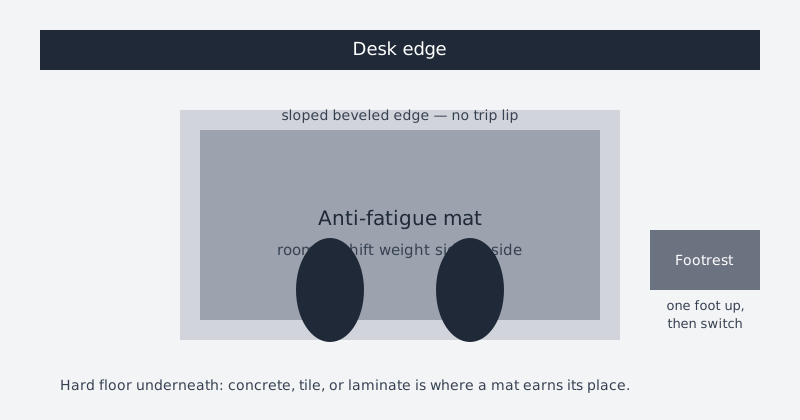
The standing zone that matters: a mat wide enough to shift weight side to side, sloped edges you cannot trip on, and a footrest beside it for alternating feet.What the evidence actually says
Mats help comfort. Movement helps more. Both claims need their qualifiers.
NIOSH’s literature review on prolonged standing at work found ample evidence that prolonged standing is associated with more reports of low back pain, physical fatigue, muscle pain, leg swelling, and tiredness. Floor mats, shoe inserts, adjustable chairs, sit-stand workstations, and compression stockings have all been used to reduce that pain, discomfort, and fatigue — but NIOSH’s conclusion ranks the interventions: dynamic movement “appeared to be the best solution,” meaning walking around or being able to shift easily between standing, sitting, and leaning during the shift. That finding still needs more research, but it sets the hierarchy honestly: a mat is a supporting player, not the fix.
CCOHS adds the position-variety principle. Its standing-position guidance opens with the line that there is no single ideal body position — the best position is a variety of positions — and pairs mats with a foot rail, a seat for rest breaks, and frequent position changes. Its sit-stand guidance is equally frank about duration: published recommendations vary from standing five minutes per hour to switching every 20, 30, 45, or 60 minutes, and “the key factor is to alternate your position as needed.” There is no single agreed standing ratio to quote, so this guide does not invent one.
Cornell is the cautionary voice. Its ergonomics guidelines note scant evidence that sit-stand furniture has cost-effective benefits, with only tentative evidence of reduced back discomfort, and warn that standing in a static posture is even more tiring than sitting in a static posture — so movement matters more than position. Its lab guidance still says to consider anti-fatigue matting where practical, alongside microbreaks, proper footwear, foam or gel insoles, and a footrest.
The laboratory evidence is mixed and modest. A University of Michigan study (Wiggermann & Keyserling, Human Factors, 2012) had 10 participants stand for four-hour sessions on four commercial mats versus linoleum on concrete. Only lower-leg discomfort was significantly influenced by mats across all four hours; there were no significant differences for lower back or knees, and no significant differences between the four mats themselves. The authors’ conclusion is the most useful buying advice in this guide: for standing workstations, mat selection can rest more on safety, durability, and cost than on perception of comfort, and hours spent standing matter far more than flooring surface — eliminating standing work, using sit-stand stations, or rotating tasks provides the greatest comfort regardless of surface. A 2018 systematic review (Speed, Harris & Keegel, Applied Ergonomics) reached a similar tempered verdict: a moderate level of evidence that cushioning reduces perceived lower-limb and lower-back discomfort, with larger, good-quality trials still needed. No effect sizes are quoted here because the full review text was not verified for this guide.
One figure you will see everywhere that this guide deliberately omits: a claimed percentage reduction in fatigue or discomfort, variously attributed to different universities. It appears on vendor and roundup pages without a verifiable primary citation we could confirm, so it is treated as unverified and left out rather than repeated.
Honest limits
When a mat will not help — or can make things worse
It does not replace sitting breaks or movement. If your calves ache after three unbroken standing hours, the fix is the break and the position change, not a thicker mat. NIOSH, CCOHS, and Cornell all say so in different words.
It does not treat or prevent disease. Nothing in the guidance cited here supports “prevents back pain,” “prevents varicose veins,” or any other therapeutic claim. The defensible language is perceived comfort and fatigue during prolonged standing, with moderate and mixed evidence.
Too-soft or too-thick mats backfire. CCOHS warns that excess cushioning from thick foam-rubber mats can cause fatigue and increase the tripping hazard. Mats that “bottom out” — compressing until they are effectively hard — performed worse in earlier studies cited by Wiggermann & Keyserling.
Curled, rolled, or sliding mats are a trip hazard. A mat that arrives rolled and never lies flat, or slides across a hard floor underfoot, creates the exact hazard its beveled edges are meant to prevent. “Ships flat” is a real feature, not marketing filler.
Contoured terrain is not for everyone. Raised rails, mounds, and calf-stretch panels invite weight shifting, but they are a poor match if you roll a chair on and off the mat, or if you need a flat, predictable surface underfoot. One maker’s beveled edge is explicitly angled for chair roll-on; most contoured mats are not designed for that.
Persistent pain is a clinician question, not a shopping question. If discomfort persists despite alternation, footwear, a footrest, and a mat, the next step is a clinician or ergonomist — not a more expensive mat.
Buying checks
What to look for, in priority order
1. Sloped, non-curling edges
CCOHS: floor mats should have slanted edges to help prevent tripping. Check for a stated bevel and for flat shipping — rolled mats that curl at the corners fail this check on arrival, whatever the material claims.
2. Size that covers your standing zone
The mat must cover the area you actually stand in, with room to shift weight side to side — that shifting is part of the benefit. An undersized mat defeats it; an oversized mat in a small space creates its own trip and curl problems. One maker explicitly sizes its 32-by-20-inch mat for desks 48 inches or wider.
3. Thickness judged at the flat area, not the peaks
Verified flat mats cluster around three-quarters of an inch. Contoured mats are thicker at their peaks by design — judge them by their neutral standing area. Remember the CCOHS rule: dense enough to cushion, not so thick it fatigues or trips.
4. Material you can live with, not a ranked comfort claim
Polyurethane foam, rubberized-gel foam, and gel-plus-foam cores all appear below, but the Michigan study found no significant comfort difference between contemporary commercial mats — so do not pay a premium for a claimed comfort ranking. Choose on cleanability, tear resistance, and whether the surface suits shoes, socks, or bare feet.
5. Cleanability and durability as the real warranty
A mat lives on the floor. Only one maker below publishes an actual wash method; the rest say “easy to clean” and stop there. Warranty length is a useful durability proxy — the verified range below runs from one year to sixteen — but a mat that bottoms out, curls, or slides has failed regardless of its warranty paper.
6. A footrest beside it, not instead of it
CCOHS and Cornell both pair mats with a footrest or foot rail for shifting weight leg to leg. The footrest guide covers placement; the mat covers the floor. They solve different halves of static standing.
Manufacturer-verified options
Three mats with specs from the makers’ own pages
Every figure below comes from the manufacturer’s own product page or spec sheet, verified November 2, 2026. Two other candidates were checked and left out or demoted for stated reasons: FlexiSpot’s DM1 has conflicting thickness figures in FlexiSpot’s own regional content (about one inch in the U.S. blog versus two and a half inches in the Australian guide) and no retrievable specs on its live product page, so no DM1 figure is published here; GelPro’s Elite could not be verified on a live manufacturer page at all, so only reseller figures exist and none are used. Where a figure could not be verified, this guide says so instead of filling the gap.
Ergodriven Topo — the contoured option
29 inches wide by 26.25 inches deep, 2.7 inches tall at its highest point and 0.85 inches thick in the neutral standing area, weighing 8 pounds. The smaller Topo Mini is 25.2 by 19.2 inches, 2.47 inches at its highest, and 4 pounds; Ergodriven sizes the full mat for users over 5 feet 4 inches and the Mini for shorter users. Material is 100% polyurethane foam with no PVC, plasticizers, or added flame retardants, per the maker. Ergodriven states near-perfect performance up to user weights of 240 pounds, and lists a 16-year warranty against manufacturing defects on its current product page (older listings cite a shorter term — the current page governs). Cleaning is the best-documented of the three: wipe clean with water, mild soap if needed, rinse thoroughly, and let it dry fully before use.
Vari Standing Mat 32-by-20 — the flat option
32 by 20 inches, three-quarters of an inch thick, with a 2-inch bevel, per Vari’s spec sheet. The top is easy-to-clean polyurethane over a supportive foam core, the surface is slip-resistant and NFSI-certified, and it ships flat so there are no curls or trip hazards on arrival. Vari sizes it for desks 48 inches or wider. Warranty is one year against defects in material and workmanship under normal use. One spec-sheet line reads as a 3-pound weight capacity, which is not a plausible user capacity and reads like a mislabeled product weight — it is not published here as a capacity.
Kensington Anti-Fatigue Mat — the thin gel-foam option
Patented rubberized-gel foam, 17 millimeters (about two-thirds of an inch) thick — the thinnest verified mat here, and a useful counterpoint to “thicker is better.” Kensington claims superior performance versus thicker polyurethane competitors and tear resistance (maker claims, attributed not endorsed); verified facts are the NFSI-certified anti-slip surface, an ADA-compliant beveled edge at an 18-degree angle designed for a chair to roll on and off, flat shipping, a vinyl- and BPA-free construction meeting Cal 117 fire standards, and a limited two-year warranty. Kensington’s product page does not publish a footprint figure, so none is given here — confirm size against the current listing before buying.
Vari ActiveMat — the second contoured option, with a caveat
Vari’s contoured sibling to the flat mat: 3.25 inches at its highest point, with raised side rails and a wide calf-stretching panel, beveled no-curl edges, and a high-density core, per Vari’s spec sheet. It is included because it shows what “contoured” means at the extreme — terrain you actively stand on, not a flat cushion. Its spec sheet does not state a clean footprint, weight, warranty, or care method in extractable text, so none of those figures are published here.
Decide in six steps
The anti-fatigue mat checklist
Count your standing hours honestly. If your standing blocks are short and frequent, with sitting in between, you may not need a mat at all. If they run an hour or more on a hard floor, you are the buyer this guide is for.
Check your floor first. Concrete, tile, and laminate argue for a mat; wood, cork, rubber, and carpet argue against rushing to buy one.
Fix the rhythm before the accessory. Set the desk to elbow height, program sitting and standing presets if you have them, and alternate on a schedule you will actually keep. A mat on top of all-day standing is still all-day standing.
Measure the standing zone, not the desk. Cover the area your feet actually occupy plus room to shift side to side, and leave clearance so the mat’s edges never become a trip line in a walkway.
Demand sloped edges and flat arrival. Reject any mat that curls, rolls, or slides on your floor — that failure mode matters more than any comfort claim on the box.
Pair it with a footrest and supportive footwear. The mat, the footrest, and the shoes are one system for breaking up static standing; buying only the mat and standing still on it misses the point the guidance keeps making.
If you work through the checklist and the answer is “not yet,” that is a good outcome — the money stays unspent and the setup still improves via the rhythm and footwear fixes, which cost nothing.
The bottom line
Buy a mat if you stand for longer bouts on a hard floor and want those bouts to feel better. Do not buy one expecting it to treat pain, replace sitting breaks, or make all-day standing healthy — no source in this guide says it does any of those things. Choose on edges, size, cleanability, and durability, in that order, and keep the standing rhythm — the alternation itself — as the main intervention. The mat is the floor’s contribution to a system whose real engine is movement.
Go here for the alternation rhythm this guide keeps pointing to — elbow-height calibration, memory presets, and hourly switching, grounded in OSHA, Cornell, and CCOHS guidance.
Go here for the mat’s partner accessory — a footrest gives one foot a perch while the mat covers the floor, and together they break up static standing.
Some links on this page may be affiliate links. See the affiliate disclosure and use the contact page for corrections or business inquiries.
Sources and verification
Primary references
Ergonomics guidance and manufacturer facts below are from the organizations’ own published pages, verified November 2, 2026. No prices, ratings, or review data were used. These are non-affiliate references.